
MINGLE
.png)

Calendar extension tool to reduce social planning scheduling friction
Using AI tools to develop a working product with no coding experience.
TIMELINE
Aug 2025-May 2026
9 Months
ROLE
Designer & Researcher
DISCIPLINES
UX Design
UX Research
Concept Testing
TEAM
Solo Project
TOOLS
Figma Make
Claude AI
Google App Script
Lovable AI
PROCESS
2.
Research
User proto-persona
Exploratory user interviews
Affinity mapping
Competitive analysis
1.
Understand, Define
Understanding problem space
Defining project goals
Deciding methods
Forming project timeline
3.
Design, Prototype
Ideation
Prototyping
4.
Evaluate
Concept Testing
Design recommendations
Future Directions
Problem
College students spend too much time coordinating plans, texting back and forth to find a time and day that works instead of actually hanging out, leading to frustration and missed opportunities.
Hi! Do you want to get lunch tomorrow at noon?
Oh sorry I can’t I have class tomorrow. What about dinner wednesday?
Oh darn. No I can’t, I have a mentor session from 6-8. Thursday work?
Hmm maybe next week...I'm leaving on thursday until the end of the weekend to visit my mother.
No problem!
*there is indeed a problem*
VALUE PROPOSITION
To help students quickly coordinate spontaneous plans alongside their other commitments, reducing scheduling friction and stress so they can better balance their social lives with their academic priorities.
Target Audience: undergrad college students (age 18-23) who lead a busy life
HYPOTHESIS 1
Users will perceive added value when their friends’ real-time status is integrated into their own schedule, making it easier to decide whether to initiate a hangout.
HYPOTHESIS 2
Users will perceive coordinating a social event with Mingle as requiring low effort.
HYPOTHESIS 3
Users will be more likely to adopt Mingle if it integrates seamlessly with their existing calendar.
INITIAL KEY RESEARCH FINDINGS
97%
respondents use text message to coordinate social plans.
54%
respondents said they prioritize academic commitments over social activities.
72%
respondents say they successfully coordinate plans by using an organized calendar or scheduling in advance.
PROTO-Persona
I conducted 7 exploratory interviews and a pre-screener survey with 33 participants to assess the problem space, following a structured interview guide, and created a proto-persona to summarize the findings.

Alex
“I use Google Calendar to plan and schedule everything. It’s hard enough to organize the things I need to prioritize, let alone plan hangouts with my friends.”

Ensure that all participants voluntarily agreed to participate and be audio recorded for concept test
RESEARCH METHODS
n=33
Pre-Screener
n=7
Pre-test
Moderated Test
30-45min Concept test
Post-test
Qualitative (5-item) & Quantitative (8-item)
.png)
Application is no longer available.
Measurement Plan
Due to limited resources and time, I was unable to test the underlying construct of scheduling friction behavior. This is how I measured my hypotheses instead:
HYPOTHESIS 1
How helpful was it to see your friends’ real-time status when deciding whether to initiate a hangout?
HYPOTHESIS 2
Users will perceive coordinating a social event with this google calendar extension as requiring low effort.
HYPOTHESIS 3
Users will be more likely to adopt this product if it integrates seamlessly with their existing calendar.
How much effort did it take to plan a social event using this extension?
How likely are you to use this product if it integrates with your existing calendar?
Competitive analysis
WHEN2MEET
Value Proposition: Quickly find common free time for groups
Key Features:
-
Simple availability selection, no account needed
-
intuitive and straightforward
Weaknesses:
-
UI is unprofessional, has ads
-
Formal for casual social meetups
PING: SOCIAL MAP
Value Proposition: Share status and location in real time to facilitate spontaneous meetups.
Key Features:
-
Real-time friend location mapping
-
Quick status updates and availability alerts
-
Notifications when friends are nearby
Weaknesses:
-
Privacy concerns with sharing location
-
Requires receivers to download app in order to be effective
Calendly
Value Proposition: Automate scheduling for professional meetings.
Key Features:
-
Calendar integration
-
Custom event types (1-on-1 meetings, group meetings, interviews, etc.)
-
Meeting polls for group scheduling
Weaknesses:
-
Focus on professional planning/scheduling


Spontaneous
PING: SOCIAL MAP
Professional
Casual
CALENDLY
WHEN2MEET
Structured
Key Insights
-
Many solutions have too many added social features.
-
User want the quickest way to coordinate and plan with others.
-
Most users use iMessage to plan social meetups.
MARKET GAPS
-
Privacy concerns around sharing location and schedule.
-
Most solutions try to replace existing tools instead of integrating.
-
No single tool combines planning, live status, and easy group adoption.
MINGLE
The solution: Created with Figma Make
CORE CONCEPT
Mingle is a Chrome extension built into Google Calendar that lets you share your status, see others’ availability, and plan hangouts effortlessly, no extra app needed.
(Prototype designed in Figma Make: click to view prompts & figma file)
Students spend 16+ hours a week on coursework but only 6–10 hours with friends mainly because it’s hard to coordinate busy schedules.
Mingle makes it efficient and easy to manage work life and social life all in one place.

.png)

Click to view clickable prototype
1. Privacy & Status Sharing
-
Users can view their friend's status that they choose to share
-
Users can share and edit their current status (active/inactive, busy, location).
-
Location sharing is optional to reduce privacy concerns.


2. Navigation Structure
Friends:
Events:
Community:
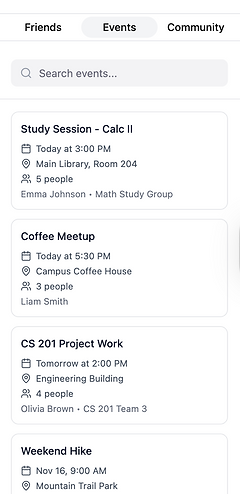


View friends’ current status and availability.
Create events for specific groups (e.g. clubs or teams)
Browse public events posted by institutions or organizations.
3. EVENT Discovery
Not sure if an event fits your schedule? Just hover to preview it, then add it if it works.


4. Finding common availability when creating an event


Concept testing
I like that I can see a preview of everyone's availability when creating a new event
It helps me know when people are available, so I know who I can reach out to and when.
Sample recording of a participant testing clickable prototype.
STRENGTHS
-
Clear availability simplifies planning.
-
Shares availability without location tracking.
-
Simplicity in activity in viewing friend list helps streamline coordination.
WEAKNESSES
-
Unclear what calendar data is shared with others.
-
Depends on updated calendars to stay useful.
-
May overlap with existing calendar or location-sharing tools.
-
Requires a browser extension, limiting mobile use.
“It’s similar to sharing location but better because it sets a boundary.”
Findings
All hypotheses were correct!
-
Viewing real time status helped users plan an event
-
It required fairly low effort to create an event using the extension
-
Participants are highly likely to adopt the tool if it integrates with their existing calendar

AI Development Tools
Now that we tested the concept, lets try to build it.
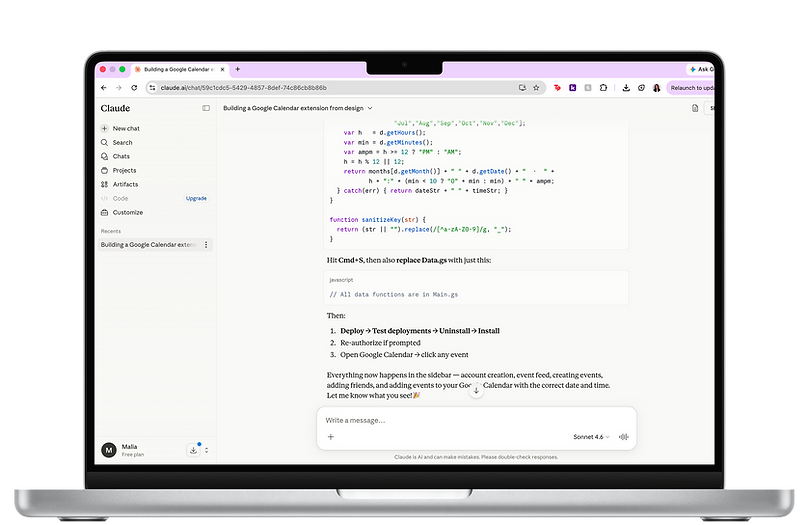

Claude AI
Prompted Claude to go step by step process of creating a google calendar sidebar extension tool.


I developed this product using Google Apps Script to integrate directly with Google Calendar, I tried Claude and Cursor AI to help write the code. But which one is better?


Cursor
Claude
Easier for making iterations to code
Harder to learn and use and as a beginner/frontend designer
Includes all main functions of app
Easy for step by step walkthrough
Poor visual Design
Good for low fidelity designs
Poor information architecture
Creates cleaner designs
quick iterations when prompted
Cursor and Claude should be used together. Claude was better for initial coding but Cursor was better for indepth/elaborate iterations further in development process.
NEXT STEPS
.png)


-
Simplify prototype
-
removing the “Community” tab to reduce clutter; reintroduce later if needed
-
-
Align UI more closely with Google Calendar
-
simplify event creation with clearer buttons
-
-
Observational Metrics
-
use observational measures instead of self-reported measures to better understand the level of effort.
-
-
Share it around campuses
-
If validated through multiple concept & usability tests, develop and share the product across campuses
-
